Image translator: point, snap, read.
Photograph a sign, a menu, a label or a screenshot. Every line is translated and pinned to the spot where it appears, so you know exactly which sign says what.
- Camera, photo, screenshot or paste
- 150+ target languages, source detected for you
- Free, no app, no account
Point at the text
Snap a photo, upload a screenshot, or paste an image (Ctrl/⌘ + V).
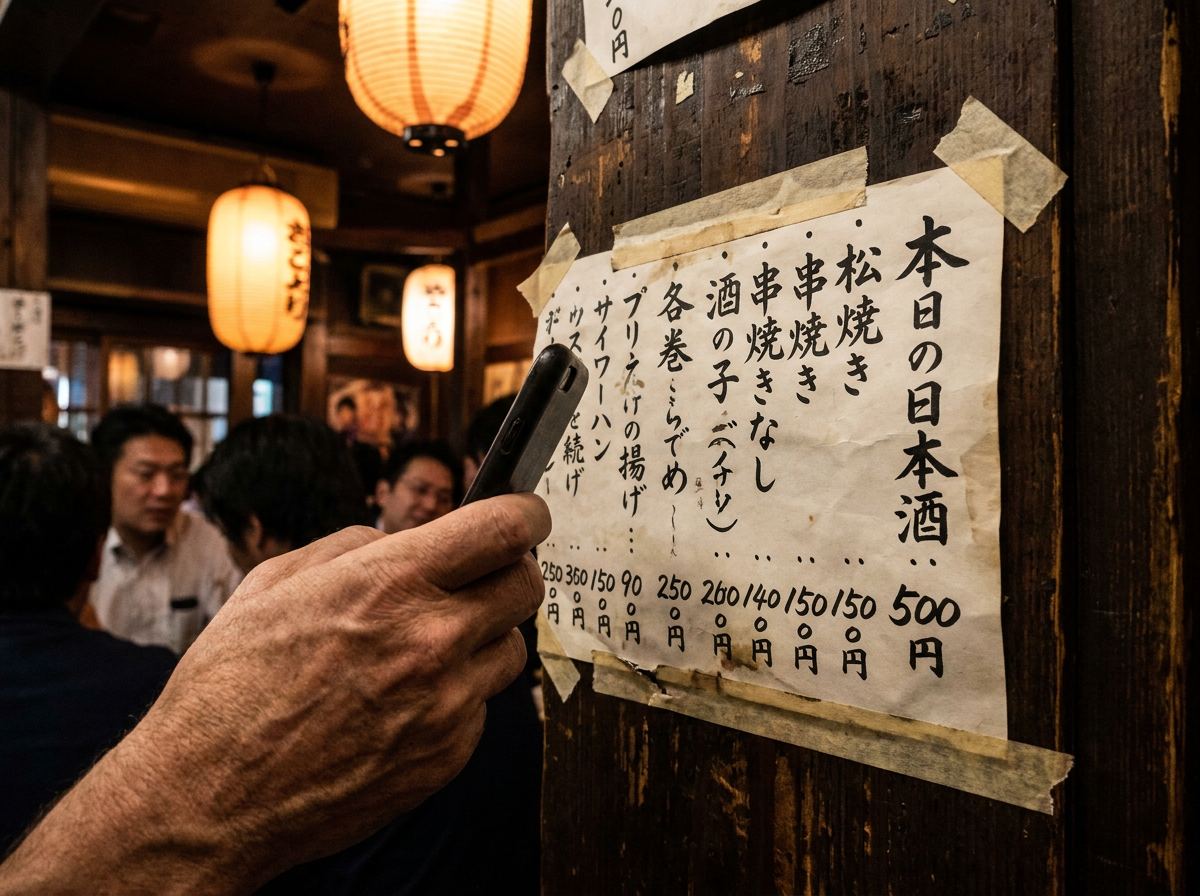
Built for the moment you are standing in front of it
Most photo translators paste a wall of translated text back at you. That is fine for a paragraph, and useless for a ticket machine with twelve buttons or a menu taped to a wall. PointTranslate keeps the link between words and places: pin 2 on the photo is line 2 in the list, with the price copied exactly as written.
Switch to Overlay to lay the translation over the original text, the way a live camera translator does. Tap any line to hear it read aloud in the target language, handy when you need to show or say it to someone.
Getting a clean read
- Fill the frame with the text you care about; crop out neighbouring signs.
- Shoot straight on. Angled shots of glossy menus pick up glare that hides characters.
- For dense pages (letters, forms, book pages) use the PDF translator, which reads a whole page in order.
Other things to point it at
Menu translator
Dish names translated and explained: what it is, how it is cooked, and common allergens.
PDF translator
Text PDFs and scanned pages, translated page by page. Download the result as text.
Word & PowerPoint
DOCX and PPTX translated in place, so headings, bold, tables and slide layouts stay put.
Voice translator
Say it in your language, hear it in theirs. Up to 30 seconds per clip.
Manga translator
Speech bubbles read in right-to-left order and overlaid on the page.
Excel translator
Text cells translated on every sheet; formulas and numbers untouched.
Language guides: Japanese, Chinese, Korean, Arabic, Thai, Russian, German, French, Spanish, Hindi.
What happens between the shutter and the translation
The photo is shrunk in your browser to at most 1,600 pixels on its long side, then sent to a vision-capable language model through Vercel AI Gateway. The model finds each block of text, works out its reading order (including vertical Japanese and right-to-left Arabic), reads it, translates it, and reports where on the photo it sits. Those coordinates become the pins.
Because the same model reads and translates, it can use context that old OCR-then-translate pipelines miss: a word on a menu is translated as food, the same word on a road sign as a direction. Step through the whole process on a real sign.
Questions
How do I translate text in a picture?
Tap "Take or upload a photo", choose the language to translate into, and PointTranslate reads every piece of text in the image and translates it. Each translation gets a numbered pin on the photo so you can see which sign or line it came from. You can also paste a screenshot with Ctrl or Cmd + V.
Is this image translator free?
Yes. There is no account, no watermark and no app to install. To keep it free for everyone there is a fair-use limit of about a dozen photos every ten minutes per connection.
Can I use my phone camera for live translation?
Yes. "Live camera" opens your phone's rear camera in the browser. Frame the sign or label and tap "Translate this" to freeze the frame and translate it. Nothing is recorded; only the single frame you choose is sent for translation.
Which languages does it read?
It reads printed text in all major scripts, including Latin, Cyrillic, Greek, Arabic, Hebrew, Devanagari, Thai, Chinese, Japanese and Korean, and can translate into more than 150 languages. Handwriting and stylised lettering work, but less reliably than print.
Does it work on handwriting and screenshots?
Screenshots are the easiest case because the text is sharp. Handwriting is readable when it is reasonably neat and the photo is in focus; very cursive notes may come back partly empty rather than guessed.
How do I translate an image to English?
Leave "From" on Detect language, set "To" to English (it defaults to your browser language), then take or upload the photo. Each piece of text is read, translated into English and numbered on the image.
Can it translate manga or comics?
Yes. The manga translator reads speech bubbles in right-to-left manga order and overlays the translation on each bubble.
Are my photos stored?
No. Your photo is resized in your browser, sent once to the AI model to produce the translation, and discarded. We keep no copy, and there is no gallery or history on our side.